Posts

Showing posts with the label SQL Server

Quick Reminder: How to Disable and Enable All Foreign Key Constraints in Database

This is one of those things I don't do that often (it just doesn't seem like a good idea) so I always have to look it up. To disable all your constraints, use the following: EXEC  sp_msforeachtable  "ALTER TABLE ? NOCHECK CONSTRAINT all" To endable all constraints, use the following: EXEC  sp_msforeachtable  "ALTER TABLE ? WITH CHECK CHECK CONSTRAINT all"

Quick Reminder: List All Tables in a Database

Here's a quick reminder of how to generate a list of tables found in a given database: SELECT   TABLE_NAME FROM   nmteachv3.INFORMATION_SCHEMA.TABLES WHERE   TABLE_TYPE = 'BASE TABLE' ORDER  BY   TABLE_NAME   This query will produce results similar to the following: TABLE_NAME AttendanceData Courses Districts Schools SchoolTypes StudentCourses Students StudentTeacherCourses TeacherAttendanceData TeacherCourses Teachers Years YearsDistricts YearsDistrictsSchools YearsTeachersSchools

Quick Reminder: How to Truncate a Database

USE [master] GO ALTER DATABASE [soapnmteach] SET RECOVERY SIMPLE WITH NO_WAIT GO USE [soapnmteach] DBCC SHRINKFILE (soapnmteach_log, 1) GO USE [soapnmteach] DBCC SHRINKFILE (soapnmteach, 1) GO USE [master] GO ALTER DATABASE [soapnmteach] SET RECOVERY FULL WITH NO_WAIT GO

Quick Reminder: How to Insert Rows Into One Table from Another Table

Just a quick reminder: INSERT INTO dbo.TargetTable (    FirstName,    MiddleInitial,    LastName,    EmployeeID,    DepartmentNumber ) SELECT    FirstName,    MiddleInitial,    LastName,    EmployeeID,    DepartmentNumber FROM    dbo.SourceTable

Quick Reminder: How to Reseed an Identity Column

Our chief statistician really, really, really, really, really hates seeing an identity column starting at something like 635197 after so much testing. I tell him it doesn't really matter but, still, before we release something for the first time to production he just really wants to see that column start at 1. Statisticians, am I right? And, if the chief statistician isn't happy, ain't no one going to be happy. So, this one's for you, Matt. Grabbed from StackOverflow and oh-so-useful. I run this after we blow the data out of a table and just before the final load before production: DBCC CHECKIDENT ('MyTable', RESEED, 0) GO Find the original article at  http://stackoverflow.com/questions/21824478/reset-identity-seed-after-deleting-records-in-sql-server.

Quick Reminder: How to Shrink Database Files

ALTER DATABASE soapnmteachtest SET RECOVERY SIMPLE GO CHECKPOINT GO DBCC SHRINKFILE(soapnmteach, 1) GO ALTER DATABASE soapnmteachtest SET RECOVERY FULL GO

List of Refresher Tutorials on Advanced Transact-SQL Techniques

Image
It never hurts to go back and look at the fundamentals. For instance, I had forgotten about the APPLY operator and was rusty on the PIVOT operator. SQLServerCentral.com has a good list of tutorials, Stairway to Advanced T-SQL , that hits most of the advanced fundamentals. http://www.sqlservercentral.com/stairway/119892/ Enjoy!

How to Drop All Data from Your Database

Quick and handy script, copped from StackOverflow: -- DROP ALL ROWS IN ALL TABLES EXEC sp_MSForEachTable 'DISABLE TRIGGER ALL ON ?' GO EXEC sp_MSForEachTable 'ALTER TABLE ? NOCHECK CONSTRAINT ALL' GO EXEC sp_MSForEachTable 'DELETE FROM ?' GO EXEC sp_MSForEachTable 'ALTER TABLE ? CHECK CONSTRAINT ALL' GO EXEC sp_MSForEachTable 'ENABLE TRIGGER ALL ON ?' GO Full post on StackOverflow can be found here: http://stackoverflow.com/questions/8439650/how-to-drop-all-tables-in-a-database

Microsoft SQL Server Version List

Image
For the bazillionth time, I had to correlate a SQL Server version number (that is, 9.00, 11.0.2000.8, etc.) to what we humans usually use (SQL Server 2005, SQL Server 2012, etc.). I printed this out and taped it to my desk. Here it is for your use: RTM  (no  SP ) SP1 SP2 SP3 SP4   SQL Server 2016      codename ? CTP3.1   SQL Server 2014      codename  Hekaton   SQL14 12.0.2000.8 12.0.4100.1 or 12.1.4100.1   SQL Server 2012      codename Denali 11.0.2100.60 11.0.3000.0 or 11.1.3000.0 11.0.5058.0 or 11.2.5058.0 11.0.6020.0 or 11.3.6020.0   SQL Server 2008 R2      codename Kilimanjaro 10.50.1600.1 10.50.2500.0 or 10.51.2500.0 10.50.4000.0 or 10.52.4000.0 10.50.6000.34 or 10.53.6000.34   SQL Server 2008      codename Katmai 10.0.1600.22 10.0.2531.0 or 10.1.2531.0 10.0.4000.0 or 10.2.4000.0 10.0.5500.0 or 10.3.5500.0 10...

Start and Stop SQL Server Reporting Services from Windows Command Line or File

Image
After learning how to start and stop Microsoft SQL Server from the command line (and thus from a command file), I decided it was time to do the same for other SQL Server services. SQL Server Reporting Services was the next. StartSSRS.cmd NET START ReportServer$SQLEXPRESS SET /p DUMMY=Hit ENTER to continue... This will start the service and, to ensure you have the opportunity to catch any messages it might throw back, wait for you to hit the ENTER key before closing the command window. StopSSRS.cmd NET STOP ReportServer$SQLEXPRESS SET /p DUMMY=Hit ENTER to continue... This stops the service and then waits for you to hit the ENTER key. Note that both command files are set up for the instance called SQLEXPRESS. Depending on what you're running and what you named it, your instance may be called something else. You can always see what the instance is named by opening the Services application, clicking on the service, and noting the Service Name: So, if like me you...

Handy Tool to Pretty-Print Your SQL Queries

I'm having to wade through some pretty long SQL statements in SSRS -- one of them clocks in at over 2200 lines. The developer who created these wasn't big on consistent formatting so visually following subqueries, complex CASE statements, etc. is a real bear. A few minutes of Googling uncovered a tool by Gudu Software called SQL Pretty Printer: http://www.dpriver.com/products/sqlpp/ssms_index.php I'm giving the trial version of the SSMS plugin a chance and so far it's proved a time- and sanity-saver. A license will run you $50. So far it's saved me enough time that buying the license is a no-brainer. There's a free online version into which you copy-and-paste your query, hit the button, and it returns a pretty-printed version which you can then copy-and-paste into your SSMS query window (or SSRS report).

Start and Stop SQL Server from Windows Command Line or File

Seeing as how I was given a regular workstation rather than a developer's workstation at my new job, RAM is at a premium. It's amazing what you can still accomplish with 4 GB but you have to be judicious in its use. Towards that end, I'm running the local instance of SQL Server on an as-needed basis. Rather than opening Services from the Windows Start menu's "Administrative Tools" item, I created two cmd files (and, yes, I should've used PowerShell): one to start the database engine instance and a second to stop the database engine instance. StartSql.cmd NET START MSSQL$SQLEXPRESS2008R2 SET /p DUMMY=Hit ENTER to continue... StopSql.cmd NET STOP MSSQL$SQLEXPRESS2008R2 SET /p DUMMY=Hit ENTER to continue... Once I had the cmd files done, I went into Services and updated the SQL Server service for that instance so that it was manually started rather than automatically started. Finally, I placed a shortcut for each cmd file on my desktop. Now, wh...

Installing the Northwinds Database with SQL Server 2012

Image
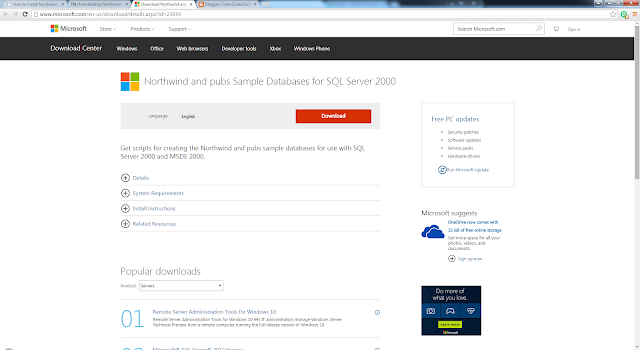
As mentioned earlier , my new gig requires a lot more day-to-day work with SQL Server, including SSIS, SSRS, and SSDS. Since most tutorials use either the AdventureWorks  database or the Northwinds database, you ought to have both in place if you want to get hands-on with the tutorials and sample out there. In the last post, we downloaded and attached the AdventureWorks database to our SQL Server 2012 installation . In this post, we'll grab the Northwinds database and attach it to the same server. Follow the steps below to obtain and install the Northwinds database. Open a web browser and go to  http://www.microsoft.com/en-us/download/details.aspx?id=23654 : Click the "Download" button and save the file  SQL2000SampleDb.zip . Click on the file to run it. You'll be asked if you really want to run the installation: Click the "Run" button. Step through the prompts: You'll find that the installation has created a new folder,  SQL Ser...

Installing the AdventureWorks Database with SQL Server 2012

Image
My newest gig requires more day-to-day work with Microsoft SQL Server. In fact, I was told there'd be more SQL than C# involved in this job. I do pretty well with SQL but I figure it wouldn't hurt to reinforce the basics and learn some new tricks. Plus, I want to play in-depth with SQL Server Integration Services ( SSIS ), SQL Server Reporting Services ( SSRS ), and SQL Server Data Services ( SSDS ). Nearly every tutorial out there uses the Northwinds database or the AdventureWorks database. AdventureWorks is pretty easy to install, so it's a good warm up exercise before we get into dealing with Northwinds. Follow the steps below to obtain and install the AdventureWorks database. Open a web browser and go to  http://msftdbprodsamples.codeplex.com/ Click on the link " AdventureWorks Databases – 2008, 2008R2 and 2012 " ( http://msftdbprodsamples.codeplex.com/releases/view/93587 ). You'll be taken to the following page: Decide which version of the Ad...