Posts

Showing posts with the label C#

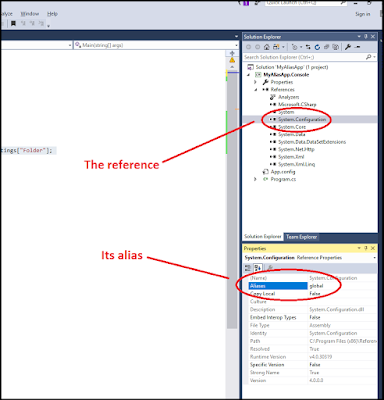
Using Reference Aliases
Image
I recently ran across a situation where two different libraries shared identical namespaces and class names. Visual Studio complained anytime I used one of these classes that it was an ambiguous reference. I needed both libraries -- each contained some unique elements -- so I couldn't ditch one or the other. But, as I said, anytime I tried to use a class that was common (again, via the class name and namespace), I received the ambiguous reference error. This was a real problem, so say the least. However, C# provides a way to specify exactly which library (reference) you mean when you use an object that's common to two or more libraries. Simply put, you use an extern alias  statement. The concept is fairly simple: Give the reference an alias (I used the Properties windows for the reference). Add an extern alias statement, putting it before your using statements. Add a using statement, which effectively links a specific object through the extern alias statement to th...

A virtual file system for .NET written in C# (found on Github)

For later review: https://github.com/bobvanderlinden/sharpfilesystem

C# chars, bytes, and strings, Oh My.

Some simple code to show the conversions between the different data types: // establish a base line System. Console .WriteLine(" Testing bytes, chars, encoding, etc. "); char myChar = ' a '; byte myCharBytes = Convert.ToByte(myChar); System. Console .WriteLine(" The number of bytes in a char is 1 byte. "); System. Console .WriteLine(" The value of myCharBytes is " + myCharBytes); // the following is wrong because it converts 97 to a string of "97" string myByteString = myCharBytes.ToString(); System. Console .WriteLine(" myByteString.Length = " + myByteString.Length); System. Console .WriteLine(" myByteString = " + myByteString); // the following is correct because it converts 97 to "a" char myGoodByteChar = Convert.ToChar(myCharBytes); string myGoodByteCharString = Convert.ToString(myGoodByteChar); System. Console .WriteLine(" myGoodByteCharString = " + myGoodByteCharString); Sys...

Quick Example of System.IO.Abstractions Use

I just got on a new project and am trying from the get-go to structure all my code so that it's easily testable. Academically, that is a no-brainer. In practice, though, some chunks of code are more difficult to structure so that they're easily testable. Towards that end, I've been pushing System.IO.Abstractions again. And, to get that going I decided it was time to refresh my examples. In the code below, we see how injecting the file system into the repository ultimately allows us to write testable code. If structured correctly, then our repository requires no subsequent refactoring to run in a unit test environment versus a "real" environment even when dealing with something like the file system. Let's take a look at our code. The Console Application The console application is straightforward. We have a private method (at the bottom) that assembles and returns a mock file system. Next, we perform the following steps: We feed that mock file system...

ASP.NET: Change page title based on database to which you're connecting

On occasion, you may find it useful to provide a visual cue that the user is not in an application's production environment. This is especially useful during a late night crunch when the developers, system administrators, and the Q.A. team are distracted and tired. Below is some code which allows you to change the page title and its style based on the database specified in a connection string. Note that we are parsing an Entity Framework connection string, not an ADO.NET connection string. Site.Master <div class="navbar navbar-inverse navbar-fixed-top">     <div class="container">         <div class="navbar-header">             <button type="button" class="navbar-toggle" data-toggle="collapse" data-target=".navbar-collapse">                 <span class="icon-bar"></span>                 <span class="...